WMS definition
A workflow management system (WMS) is software that coordinates tasks across people and systems using defined steps, rules, and approvals. A good WMS provides visibility (status, ownership), control (governance, audit trails), and adaptability (exceptions and changes) so teams can execute work consistently at scale.
- A WMS orchestrates work across roles—more than just automation triggers.
- Governance matters: approvals, audit trails, and versioning prevent drift.
- Start with one workflow and expand once the pattern is stable.
- Choose tools that support exceptions and human decision points.
- Integration strategy (APIs + browser agents) determines real-world fit.
What a workflow management system does
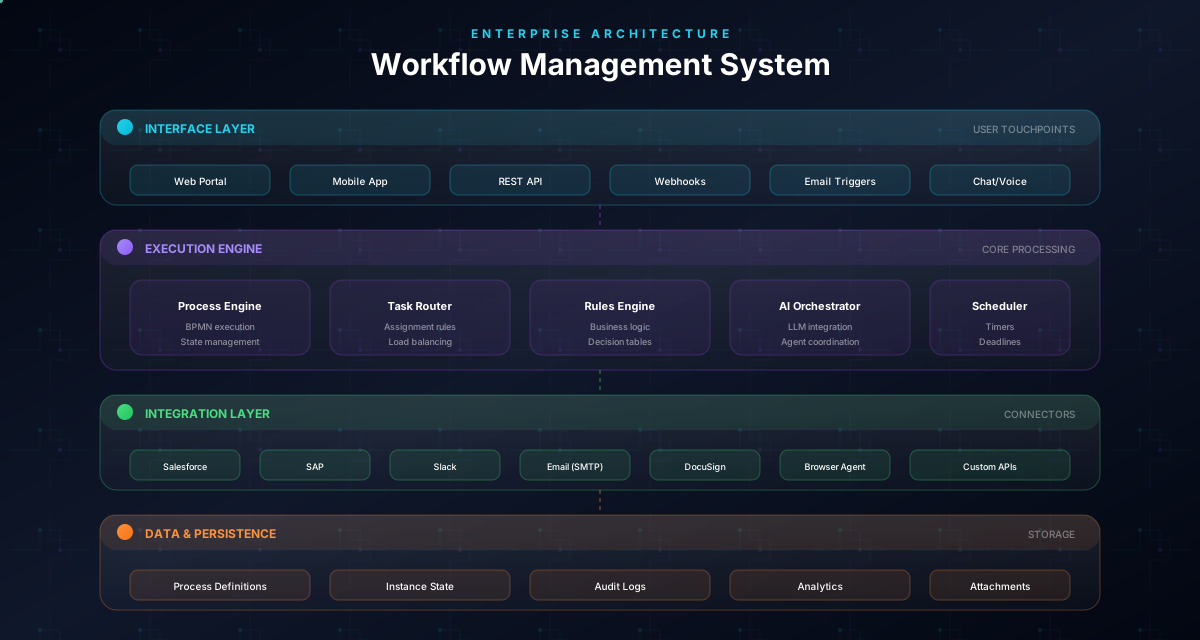
A WMS answers three operational questions:
- What should happen next? (the workflow definition)
- Who owns it right now? (assignment and responsibility)
- What happened and why? (history and auditability)
In practice, that means: routing tasks, handling approvals, notifying people, integrating with tools, and keeping a clear record.
If your workflows live in email threads, spreadsheets, and tribal knowledge, a WMS gives you a single, shareable system of record.
Must-have capabilities (checklist)
When evaluating a WMS, look for these essentials:
- Visual workflow design (so non-technical owners can validate)
- Human-in-the-loop approvals (pause, sign-off, continue)
- Exception paths (what happens when the happy path fails)
- Ownership + role-based access (who can change what)
- Audit trail (every decision logged)
- Versioning (process changes tracked)
- Integrations (APIs, webhooks, and fallbacks)
A WMS without governance becomes “workflow theater”: pretty flows, messy execution.
Important
If a tool cannot model exceptions and approvals cleanly, teams will route exceptions through side channels (email/DMs) and your workflow will drift.
WMS vs workflow automation tools
Many tools can automate. Fewer can manage workflows.
- Automation tools are great for triggers and simple integrations.
- Workflow management is about orchestration: visibility, approvals, exceptions, and accountability.
If your workflow includes judgment, compliance, and handoffs, you need a WMS mindset — not only integrations.
Common WMS use cases (high ROI)
These use cases tend to deliver fast value:
- Approvals: purchases, invoices, discounts, policy exceptions
- Onboarding: customer onboarding, employee onboarding
- Service workflows: IT service, HR requests, support escalation
- Compliance: evidence collection, reviews, access changes
- Operations: recurring reporting, vendor management
The best use cases share a pattern: repeatable steps + a few critical decision points.
A simple selection framework
Ask these four questions:
- Who will own the workflow? (business owners vs IT)
- How much governance is required? (audit trails, approvals)
- How messy are your systems? (APIs vs UI workarounds)
- How often does the process change? (versioning and iteration)
Then map tools to reality, not to feature lists.
Evaluate on exceptions, not happy paths
In demos, ask: “What happens when a required field is missing, someone rejects the request, or the tool is down?” The answer tells you if the WMS works in the real world.
Execution model: how work actually moves in a WMS
A WMS is an execution layer. It turns “a definition of work” into “work that is running”.
A simple mental model:
- Definition: the workflow (steps, rules, approvals)
- Instances: each real case (one invoice, one onboarding, one request)
- State: where the instance is right now (waiting, approved, running)
- Ownership: who is accountable for the next action
- History: what happened and why
Why this matters
If you don’t model state and ownership explicitly, your workflow will leak into side channels. A good WMS makes waiting visible, escalations manageable, and decisions auditable.
A practical “state” checklist
- Can a case be paused (waiting for approval)?
- Can it be escalated when a timer expires?
- Can it be rerouted when a role changes?
- Can it be repaired without starting over?
If the answer is “not really”, you’re buying an automation tool — not workflow management.
Insight
Most workflow delays are waiting delays. A WMS that makes waiting visible will feel transformative for operations teams.
Approvals + exceptions: the reliability layer
In real operations, the happy path is often the minority.
Design your WMS usage around:
- Explicit approvals (pause → sign-off → continue)
- Rejection paths (what happens when “no” is the outcome)
- Escalations (what happens when nobody responds)
- Exception queues (where automation hands off to humans)
A reliable pattern for new workflows
- Start with clear human steps + approvals
- Add automation only where the rules are stable
- Keep a repair loop for ambiguous cases
If a WMS can’t handle exceptions elegantly, people will create side processes in email — and your “workflow” becomes a diagram again.
Exceptions are data
Track exception categories. If one exception happens often, it’s not an exception — it’s a missing rule or step.
Integration strategy: APIs, webhooks, and UI fallbacks
Integrations determine whether a WMS works in the real world.
Three integration layers
- APIs: the best option when available (reliable, observable)
- Webhooks/events: trigger workflows when systems change
- UI automation / browser agents: a practical fallback for legacy tools
What to validate before you commit
- Failure handling: retries, timeouts, dead-letter queues
- Idempotency: can a step safely run twice?
- Observability: can operators see failures without engineering?
- Data quality gates: what happens when inputs are incomplete?
A vendor saying “we integrate with everything” is not enough. You want to know how integration fails and how teams recover.
Tip: ask to see an integration fail in a demo (rate limit, timeout, missing field).
Important
If integration errors are invisible to operators, your WMS will quietly create backlog — then you’ll rebuild the workflow in spreadsheets to regain visibility.
Governance & security: requirements that prevent drift and risk
A WMS often touches money, access, and compliance — so governance is not optional.
Minimum requirements to demand:
- RBAC: who can view/edit/approve
- Audit trails: decisions, timestamps, and rationale
- Versioning: what changed and why
- Approval controls: explicit steps, not “implicit agreement”
- Separation of environments: if you run regulated workflows
If you can’t reconstruct decisions during an audit, you don’t have workflow management — you have operational risk.
Implementation plan: go from email → WMS without breaking work
A WMS rollout should feel incremental, not disruptive.
Week 1–2: pick one workflow and define success
- choose a high-frequency workflow with clear outcomes
- define 2–3 metrics (cycle time, approval latency, exception rate)
- assign an owner and review cadence
Week 3–4: model and launch a human-first v1
- map the current process and top exceptions
- launch with manual steps + approvals
- use the WMS as the single system of record
Month 2: automate stable steps
- automate only steps with stable rules
- keep exception queues and repair loops
- add integrations incrementally
Month 3+: scale the playbook
- reuse templates and patterns
- migrate the next workflow
- standardize governance (versioning, audit, change control)
The goal is not “automation everywhere”. The goal is reliable execution at scale.
Ship v1 with governance
Versioning + audit trail should be present from day one. Retrofitting governance later is painful and expensive.
20 demo questions that reveal if a WMS is real
Use these questions to cut through feature lists:
- How do you model approvals and rejections?
- What happens when someone doesn’t respond?
- Can you represent “waiting” as a first-class state?
- How do you model exception paths?
- Do you have an exception queue / repair loop?
- What does the audit trail look like?
- How does versioning work?
- Who can change workflows (RBAC)?
- How do you test safely before production?
- How do retries/timeouts work for integrations?
- Can steps be idempotent?
- How are failures surfaced to operators?
- How do you measure cycle time and exception rate?
- Can business owners review workflows visually?
- How do you handle parallel approvals?
- How do you implement timers and SLAs?
- Can you export documentation/SOPs?
- How do you prevent drift?
- What does onboarding workflow #2 look like?
- What’s the migration story from spreadsheets?
If a vendor can’t answer these clearly, expect side channels to return.
WMS architecture (in plain English): the parts that make it work
A workflow management system looks simple on the surface (“route tasks”), but reliable execution needs structure.
Core components
- Workflow definition: steps, rules, approvals, timers
- Case/instance store: every running workflow instance and its state
- Task queue: human work to be done (with ownership)
- Event engine: triggers and transitions (approved, rejected, timed out)
- Integration layer: APIs/webhooks and fallbacks
- Audit + history: what happened, when, and by whom
Why this matters during evaluation
If a tool doesn’t have a clear concept of “case state”, “ownership”, and “history”, it will struggle with:
- escalations
- exception handling
- partial approvals
- compliance evidence
A simple architecture test
Ask: “How does a workflow instance move from waiting to running? Where is that state stored? Who can see it?”
A real WMS can answer in minutes. A glue-automation tool will hand-wave.
Workflow patterns you’ll need in production (beyond the happy path)
Most workflows become hard for the same reasons: parallel work, time, and exceptions.
Pattern 1: parallel approvals
- approve by role (finance + legal)
- merge outcomes (all must approve vs any can approve)
Pattern 2: escalation by time
- if no response in 24–48h: notify
- then escalate to manager
- then reroute to backup approver
Pattern 3: exception queue + repair loop
- route ambiguous cases to a queue
- give operators a clear “repair” action
- re-run the automated step
Pattern 4: evidence capture
- store the decision, timestamp, and key context
- attach artifacts (documents, screenshots, links)
A WMS should make these patterns easy.
Pro Tip
If a vendor can’t model parallel approvals and time-based escalations cleanly, you’ll rebuild them manually with email — and drift will return.
Operations & metrics: how to run workflows like a system
After launch, your WMS becomes part of operations — which means you need operational habits.
The 6 dashboards that prevent chaos
- Work-in-progress (WIP): what’s running right now
- Aging: which cases are stuck and for how long
- Approvals: pending approvals by owner/role
- Exceptions: categories and volume
- Cycle time: end-to-end performance
- Rework: loops and repairs
Operating cadence that works
- weekly: review stuck work + top exceptions
- monthly: review metrics + improvement backlog
- quarterly: review workflow versioning and governance
A WMS is not “set and forget”. The win is that you can see the system and improve it intentionally.
Turn exceptions into backlog
If the same exception appears every week, it’s not an exception — it’s a missing rule, missing input, or missing step.
Adoption: why rollouts fail (and how to avoid it)
WMS rollouts usually fail for human reasons:
- people don’t trust the workflow definition
- approvals feel like extra work
- exceptions are easier in Slack/email
- operators don’t know where to report “this step is wrong”
Adoption tactics that work
- start with one workflow where the pain is obvious
- make ownership visible (process owner + review cadence)
- design exception paths so reality stays inside the system
- publish SOPs where the work happens
- measure one win (cycle time, approval latency) and broadcast it
The goal is not to force behavior. The goal is to make the workflow the easiest path — including for exceptions.
No-code vs low-code vs custom: choosing the right approach
There are three common implementation paths:
- No-code: fastest to launch, best for stable workflows and business-led ownership
- Low-code: best when you need custom rules, integrations, or governance at scale
- Custom build: only when workflows are core product logic or requirements are unique
A practical decision rule
- If you have many workflows with similar patterns → prefer no/low-code WMS + templates.
- If you have one complex workflow with unique logic → consider low-code or custom.
Important
Custom build is rarely cheaper. The ongoing cost is governance, change control, and operational support — not the first version.
Use case walkthrough: purchase approval workflow (end-to-end)
Here’s what an end-to-end workflow looks like in a WMS.
Trigger
- employee submits a purchase request
Validation
- required fields present (amount, vendor, cost center)
- policy checks (thresholds)
Routing + approvals
- amount < 1,000 → manager approval
- amount >= 1,000 → manager + finance approval
- high-risk vendors → legal review
Exceptions
- missing cost center → return to requester
- approver timeout → escalate
- rejection → capture reason and close
Evidence
- store who approved/rejected, when, and why
- attach documents and links
This is exactly the kind of workflow where a WMS creates leverage: visibility, accountability, and predictable outcomes — even when reality is messy.
Feature deep dive: what “good” looks like (beyond checklists)
Many WMS feature lists look identical. What matters is how the features behave in production.
Task assignment and ownership
A good WMS supports:
- assignment by role (not just by person)
- backup owners and rerouting when org changes
- clear “who owns the next step” visibility
Forms and data validation
Look for:
- required fields per step
- validation rules (not only at the start)
- “return to requester” loops with context
Rules and routing
Routing should be:
- explicit (readable)
- testable (you can simulate cases)
- auditable (why did it route this way?)
Timers, SLAs, and escalation
This is where many tools fail.
You want:
- timers per step
- escalation policies
- audit trail of escalations
Audit trail and evidence
Good auditability is more than logs.
It should be easy to answer:
- who approved
- when
- why
- with which context
If a vendor can’t show these flows live in a demo, treat the checklist as marketing.
Tip: ask to see a rejection, a timeout escalation, and a repair loop — not only the happy path.
Integration failure modes: how reliable WMS automation is designed
Real integrations fail. The question is whether the workflow survives.
Failure modes you must plan for
- timeouts
- rate limits
- partial failures (API succeeded but response lost)
- duplicate events
- missing fields / bad data
Reliability patterns
- Retries with backoff: try again safely
- Idempotency: running a step twice should not break things
- Compensation: if step B fails after step A, how do you recover?
- Dead-letter queue: when retries fail, route to humans
- Repair loop: operators fix data and re-run safely
Operational visibility
Operators should see:
- what failed
- what data caused it
- what to do next
Otherwise, engineering becomes the exception queue.
This is why a WMS is more than integrations. It’s a reliability layer over messy reality.
Important
If you can’t safely retry steps, automation becomes a source of duplicates and ghost work — and teams will distrust the system.
Security and controls: what matters when workflows touch money and access
A WMS often becomes part of your control environment.
Minimum control requirements
- Least privilege: users only see what they need
- RBAC: edit vs approve vs view are separated
- Segregation of duties: requester cannot approve their own request
- Audit trail: immutable-ish history of decisions
- Data handling: PII and sensitive documents are protected
Practical questions to ask
- Can we restrict approval authority by amount/department?
- Can we enforce multi-approval for thresholds?
- Can we export audit evidence for a date range?
- Can we revoke access without breaking history?
If the tool can’t answer these, it’s likely not designed for operational governance at scale.
WMS vs project tools vs ticketing vs automation: avoid category mistakes
A common failure mode is buying the wrong category.
Project management tools
Great for planning and collaboration. Weak for approvals, audit trails, and execution semantics.
Ticketing systems
Great for incident/request tracking. Often weak at multi-step orchestration across systems.
Glue automation tools
Great for triggers and simple integrations. Weak at ownership, governance, and exception handling.
Workflow management systems
Built for:
- stateful execution
- ownership
- approvals
- exceptions
- governance
If your “workflow” is really an end-to-end operational process, a WMS mindset is the right baseline — even if you start with a human-first v1.
Decide by risk and exceptions
If the workflow touches compliance, money, or access — and has exceptions — treat it as WMS territory, not simple automation.
Operating model for WMS: who owns workflows after go-live?
A WMS becomes a production system. That means you need clear ownership.
Minimum roles
- Workflow owner: accountable for outcomes and policy decisions
- Ops lead / operators: handle exceptions, run repair loops, monitor aging
- Platform/IT owner: integrations, reliability, security, access control
Ownership checklist (per workflow)
- who can change the workflow definition?
- who approves changes to approvals/controls?
- what is the review cadence?
- where are exceptions handled?
- how do users report “this step is wrong”?
If these questions are unanswered, workflows will drift back into email.
A lightweight CoE can help by standardizing templates, patterns, and governance — without centralizing execution.
SLAs, timers, and business hours: design for the real clock
Many workflows fail not because the steps are wrong, but because time is ignored.
Design questions
- what is the SLA for the end-to-end outcome?
- which step is the biggest waiting bottleneck?
- what happens when a step times out?
- do timers follow business hours or calendar time?
Practical timer patterns
- reminder: nudge the current owner
- escalation: route to manager or backup
- auto-close: cancel stale requests with evidence
- reassignment: on vacation/role change
Why this is a WMS differentiator
Tools that treat time as a first-class concept (timers + escalation + audit trail) are dramatically easier to operate.
If the tool can’t do this, your “SLA” will be a spreadsheet again.
Pro Tip
Ask a vendor to model “approval must happen within 48 business hours” and show the escalation path. You’ll learn more than from any slide deck.
Rollout playbook: a 90-day path from pilot to repeatable scale
If you want a WMS to stick, treat the first workflow as a product launch.
Days 1–14: pick the pilot and define success
- pick a workflow with recurring pain
- define 2–3 metrics (cycle time, approval latency, exception rate)
- assign owner + governance
Days 15–30: launch a human-first v1
- capture happy path + top exceptions
- ship with explicit approvals and audit trail
- publish SOP at point of work
Days 31–60: stabilize and instrument
- categorize exceptions
- add timers, escalation, repair loops
- create dashboards (WIP, aging, exceptions)
Days 61–90: automate stable steps and replicate
- automate low-risk, rule-based steps
- keep exception queues for the rest
- migrate workflow #2 using the same templates
This is how you scale WMS usage without losing trust.
Don’t scale before trust
If workflow #1 isn’t trusted, workflow #2 won’t be adopted. Stabilize, then replicate.
Evaluation scorecard (template): compare WMS options without guesswork
If you’re comparing tools, a scorecard prevents “demo bias”.
Step 1: define weights (example)
| Category | Weight |
|---|---|
| Approvals + exceptions | 25 |
| Governance + audit | 20 |
| Integrations + reliability | 20 |
| Usability for business owners | 15 |
| Reporting + visibility | 10 |
| Security + admin | 10 |
Step 2: score 1–5 per category
Then multiply by weight.
What to look for in each category
- Approvals + exceptions: rejection paths, escalation timers, repair loops, exception queues
- Governance + audit: versioning, audit trail, RBAC, SoD controls
- Integrations + reliability: retries, idempotency, failure visibility, safe re-runs
- Usability: visual design, review flows, templates, clear ownership
- Reporting: WIP, aging, exception volume, cycle time
- Security/admin: access control, environment separation, admin workflows
Step 3: validate with a realistic scenario
Pick one real workflow (purchase approvals, onboarding, access requests) and ask the vendor to model:
- a rejection
- a timeout escalation
- a missing-data repair
- an integration failure
If the tool can’t do this, the scorecard will catch it.
You can reuse this scorecard for every workflow tool decision — and avoid re-learning the same lessons.
WMS glossary (quick definitions)
- Workflow definition: the designed steps/rules.
- Instance/case: one running occurrence.
- State: where the case is right now.
- Task queue: human work waiting to be done.
- Exception queue: cases that need manual repair.
- Repair loop: fix data and re-run.
- Escalation: time-based rerouting.
- Idempotency: safe to run a step twice.
- Audit trail: who did what, when, and why.
Shared language prevents category mistakes and speeds up adoption.
Use case library: 8 workflows a WMS handles especially well
If you’re looking for high-ROI workflows, start here.
1) Purchase approvals
- approvals + thresholds
- escalation timers
- audit evidence
2) Invoice processing
- validation + matching
- exception handling for missing data
- approval routing
3) Access requests (security/compliance)
- SoD controls
- dual approvals
- evidence capture
4) Customer onboarding
- handoffs across roles
- “waiting for customer” states
- clear activation outcome
5) HR requests
- structured intake
- approvals and routing
- SLA visibility
6) IT service workflows
- triage and routing
- escalation paths
- integration with ticketing
7) Policy exception handling
- capture rationale
- approvals and audit trail
- recurring exception analysis
8) Recurring operational reporting
- ownership and handoffs
- status visibility
- error recovery
Across all of these, the value is the same: state + ownership + governance + exception handling.
Migration guide: move from spreadsheets and email without breaking operations
Most teams don’t “switch” to a WMS. They migrate gradually.
Step 1: make the WMS the system of record
Even before automation, ensure every case lives in the WMS with:
- owner
- state
- next step
- history
Step 2: keep side channels, but make them secondary
Let people discuss in chat/email, but require decisions to be recorded in the WMS.
Step 3: model exceptions early
If exceptions are not modeled, they will stay in side channels forever.
Step 4: automate only stable steps
Start with:
- notifications
- routing
- validation
Keep approvals and repair loops human-first.
Step 5: instrument and improve
Create a simple dashboard for:
- aging cases
- pending approvals
- top exception categories
Migration succeeds when the WMS becomes easier than the spreadsheet — even for exceptions.
Important
If you try a big-bang migration, teams will keep a parallel spreadsheet “just in case” — and you’ll lose trust immediately.
Detailed case study: access requests (a workflow that needs real governance)
Access requests are a perfect “WMS reality check” because they combine:
- approvals
- risk
- audit requirements
- exceptions
A realistic access request workflow
Trigger: an employee requests access to a system.
Validation:
- user identity
- target system
- role requested
- business justification
Routing + approvals:
- manager approval
- system owner approval
- security approval for privileged access
Controls:
- SoD: requester cannot self-approve
- thresholds: privileged roles require dual approval
Exceptions:
- missing justification → return to requester
- approver timeout → escalate
- rejection → capture reason code
Evidence:
- who approved
- when
- what was approved
- why
What changes when you run this in a WMS
- waiting becomes visible
- escalation is automatic, not ad hoc
- audit evidence is produced as a byproduct
- exceptions are categorized and reduced over time
This is why governance features matter: without them, teams “do the work” but can’t prove they did it safely.
Implementation checklist (copy/paste): make the first workflow stick
Use this checklist for your first WMS workflow.
Definition
- Trigger and outcome defined
- Roles and ownership defined
- Approvals explicit (and rejection paths defined)
- Top exceptions modeled (repair loop exists)
Governance
- RBAC defined (view/edit/approve)
- Versioning enabled
- Change approval process defined
- Review cadence scheduled
Reliability
- Timers and escalation paths defined
- Integration failure handling defined (retries + dead-letter)
- Idempotency strategy documented (when automating)
Operations
- WIP and aging dashboards created
- Exception categories tracked
- Runbook for common failures written
Adoption
- SOP published at point of work
- Training delivered to operators and approvers
- Feedback channel created (“this step is wrong”)
If you can check these off for workflow #1, workflow #2 becomes much easier.
WMS FAQ (deep dive): practical questions before you buy and after you launch
“Is a WMS only for ‘enterprise’ teams?”
No. A WMS is useful whenever work crosses people and systems and needs predictable outcomes. Small teams benefit just as much — especially when approvals and exceptions are frequent.
“Can we start without integrations?”
Yes. A strong pilot can be human-first: tasks, approvals, and clear ownership. Integrations come after the workflow is stable and you know which systems matter.
“How do we prevent side channels from returning?”
Design exception paths explicitly (repair loops, escalations, exception queues) and require decisions to be recorded in the system. Side channels usually return when the workflow can’t handle reality.
“What metrics should we track?”
Start with cycle time, approval latency, and exception rate. Add rework loops and SLA adherence once you have basic instrumentation.
“What makes workflows ‘drift’?”
Unowned workflows, unlabeled decisions, and unhandled exceptions. Drift isn’t a moral failure — it’s a design failure. Governance is the fix.
“Do we need BPMN?”
Not always. But when ownership, handoffs, and approvals matter, BPMN makes workflows unambiguous and reviewable.
“What’s the biggest hidden cost?”
Operating the workflow: exception handling, retries, access control, and change management. The first version is the cheap part.
“How do we roll out workflow #2 and #3?”
Reuse patterns and templates. If each workflow is bespoke, you’re building a custom platform without realizing it.
“When should we build custom instead?”
Only when workflows are core product logic or requirements are truly unique. Otherwise, a WMS with governance + templates is usually faster and safer.
If you can answer these questions clearly, you’ll choose a system that survives beyond the demo.
Common mistakes to avoid
Learn from others so you don't repeat the same pitfalls.
Choosing a WMS that only demos well
Demos show happy paths; reality is exceptions.
Test exception handling, approvals, and change management.
No ownership for workflows
Workflows drift and become outdated quickly.
Assign an owner, review cadence, and change process.
Trying to migrate everything at once
Big-bang rollouts stall and lose trust.
Start with one high-ROI workflow and expand.
Take action
Your action checklist
Apply what you've learned with this practical checklist.
List 3 workflows with recurring pain
Define owners and stakeholders for one pilot
Document the happy path + top exceptions
Add explicit approval steps
Define audit requirements (who/what/when/why)
Validate integrations (APIs + fallbacks)
Run a 2–4 week pilot, then expand