Definition
Workflow automation uses defined steps, rules, and approvals to move work across people and systems with less manual coordination. The best workflows automate repeatable parts, keep humans in the loop for judgment calls, and log decisions so execution stays auditable as processes evolve.
- Start with coordination-heavy workflows (approvals, handoffs, reminders).
- Automate stable steps; keep approvals for risky decisions.
- Design for exceptions: missing data, rejections, timeouts.
- Measure impact with cycle time and exception rate.
- A workflow is only “done” when it has an owner and review cadence.
10 high-ROI workflow automation examples
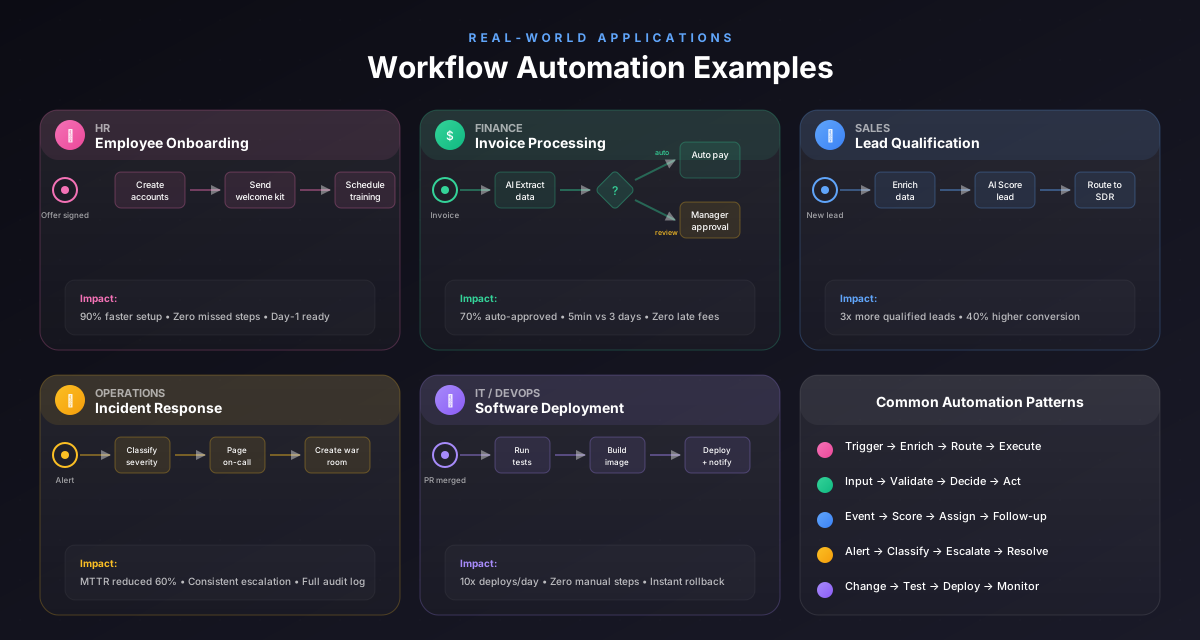
Here are examples that work across many organizations:
- Invoice approvals (thresholds + exceptions)
- Purchase requests (budget checks + routing)
- Customer onboarding (handoffs + checklists)
- Employee onboarding/offboarding (access + equipment)
- IT service requests (triage + escalation)
- Contract review (parallel review lanes)
- Compliance evidence collection (scheduled reminders)
- Vendor onboarding (KYC + approvals)
- Recurring reporting (data collection + publishing)
- Incident management (notifications + postmortems)
These succeed because they combine repeatability with a few critical decision points.
Examples by department
Operations
- approval chains
- SOP enforcement
- escalation handling
Finance
- invoice approvals
- PO routing
- exception management
HR
- onboarding/offboarding
- policy exceptions
- request workflows
IT
- service workflows
- access changes
- incident response
The pattern is the same: define steps, owners, and exception rules.
What should stay human-in-the-loop?
Keep humans involved when:
- the decision is high-stakes (money, risk, compliance)
- the input data is messy or incomplete
- customer impact is high
- the exception rate is still unknown
Automation is strongest when it augments judgment rather than replacing it.
Pro Tip
If you’re unsure, add an approval step first. You can automate more later when you trust the pattern.
Patterns that make automation reliable
Use these patterns to avoid brittle workflows:
- Explicit approvals: pause → sign-off → continue
- Escalation rules: what happens when someone doesn’t respond
- Timeouts + retries: for integrations and agents
- Clear ownership: who fixes exceptions
- Versioning: process changes tracked and reviewed
Reliability is a design choice.
Design exceptions first
Ask: “What breaks most often today?” Model that as an explicit exception path. This is where workflows win trust.
Common mistakes to avoid
Learn from others so you don't repeat the same pitfalls.
Automating before standardizing
You accelerate chaos.
Standardize SOPs first, then automate stable steps.
Ignoring approvals and audit trails
Risk moves to side channels.
Model explicit approvals and log decisions.
No exception ownership
Failures linger and trust drops.
Assign who handles exceptions and how they escalate.
Take action
Your action checklist
Apply what you've learned with this practical checklist.
Choose one workflow with clear pain
Document happy path + top exceptions
Add explicit approvals
Define escalation rules
Automate stable steps only
Measure cycle time + exception rate
Assign an owner and review cadence