Quick definition
No-code process automation lets non-technical teams build workflows using visual builders and configuration. Low-code automation adds scripting or code to handle complex logic, integrations, or custom UI. No-code optimizes speed and adoption; low-code optimizes flexibility. Many organizations succeed with a hybrid model.
- No-code is fastest for business adoption and iteration.
- Low-code is better for complex integrations and custom logic.
- Governance (roles, audit trails, versioning) matters for both.
- Hybrid approaches reduce bottlenecks between business and IT.
- Choose based on process stability, risk, and integration complexity.
No-code vs low-code: what's the difference?
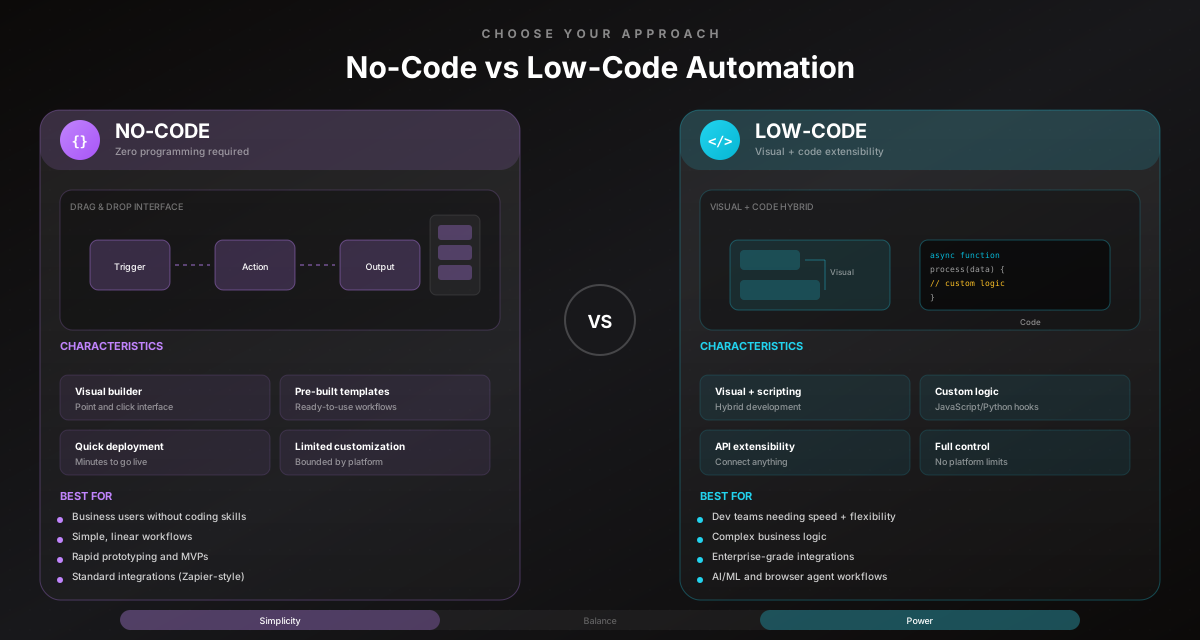
No-code: build workflows with visual steps, rules, and configuration. Designed for business users.
Low-code: combine visual workflows with code for custom logic and integrations.
A useful mental model:
- no-code = fast iteration and broad adoption
- low-code = deeper customization when needed
Comparison (trade-offs)
| Dimension | No-code | Low-code |
|---|---|---|
| Speed | Very fast | Fast to moderate |
| Adoption | High | Depends on skill |
| Flexibility | Medium | High |
| Maintenance | Lower | Higher (code) |
| Governance | Needed | Needed |
| Best for | Stable patterns | Complex logic/integrations |
No-code wins when the process owner is in the business team. Low-code wins when integration complexity dominates.
Pro Tip
If a workflow changes weekly, no-code is usually the better starting point. If the workflow depends on deep system logic, low-code might be required.
Decision framework: how to choose
Ask these questions:
-
Who owns the workflow?
- business owners → no-code
- engineering team → low-code
-
How risky are decisions?
- high risk → keep approvals and strong audit trails
-
How complex are integrations?
- APIs + clear data → no-code often works
- legacy UIs + edge cases → hybrid (agents + approvals)
-
How stable is the process?
- unstable → no-code + quick iteration
- stable → automate more aggressively
The hybrid model (recommended for most teams)
A practical approach:
- model the workflow visually (shared understanding)
- standardize as SOP
- automate stable steps with no-code
- keep approvals for judgment calls
- add low-code extensions only when needed
Hybrid reduces bottlenecks: business can iterate, IT can extend safely.
Optimize for maintainability
The “best” automation is the one your team can maintain. If only one developer understands it, it’s a risk—no matter how powerful it looks.
Common mistakes to avoid
Learn from others so you don't repeat the same pitfalls.
Choosing low-code for everything
Adoption slows and maintenance costs rise.
Use no-code for common patterns and extend only where needed.
Choosing no-code without governance
Workflows drift and become unsafe.
Add ownership, review cadence, and audit trails from day one.
Ignoring the integration reality
APIs aren’t always available; UI workarounds break.
Plan for hybrid execution (APIs + agents) and approvals.
Take action
Your action checklist
Apply what you've learned with this practical checklist.
Decide workflow ownership (business vs IT)
Model the workflow visually
Standardize as SOP + assign owner
Automate stable steps with no-code
Add approvals for high-risk decisions
Add low-code only where required