Quick answer
Use flowcharts for quick explanations and brainstorming. Use BPMN 2.0 when you need clear ownership (swimlanes), explicit decisions, exceptions, approvals, and a path from documentation to automation. BPMN is a shared standard; flowcharts are a flexible sketch.
- Flowcharts optimize for speed; BPMN optimizes for shared precision.
- BPMN makes roles and handoffs explicit with lanes.
- If approvals and exceptions matter, BPMN is usually the better choice.
- Start with a flowchart and evolve to BPMN as complexity grows.
- Clarity beats completeness in both notations.
The core difference
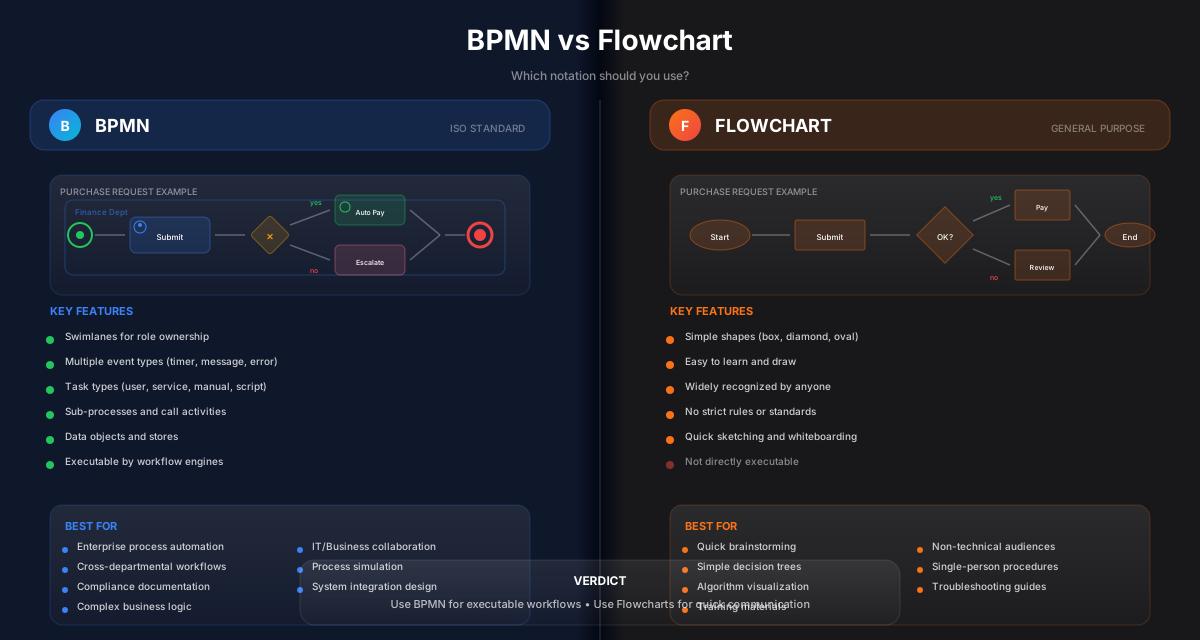
A flowchart is a flexible way to visualize a sequence. BPMN is a standardized language for modeling processes.
That standardization matters when multiple people need to agree on:
- who does what
- what decisions mean
- what happens on exceptions
- where approvals are required
If your diagram will be used for execution or governance, BPMN gives you more structure.
Side-by-side comparison
| Aspect | Flowchart | BPMN 2.0 |
|---|---|---|
| Goal | Fast communication | Operational clarity + standard |
| Roles | Optional | Built-in (pools/lanes) |
| Decisions | Informal | Gateways with explicit logic |
| Exceptions | Often skipped | First-class modeling |
| Approvals | Usually implicit | Explicit activities + outcomes |
| Automation readiness | Not designed for | Designed for execution semantics |
Both are useful — for different jobs.
Pro Tip
If the diagram is for a workshop, use a flowchart. If it’s for running a process, use BPMN.
When flowcharts are the right tool
Choose flowcharts when you need:
- quick brainstorming
- explaining a simple concept
- a lightweight process overview
- diagrams for mixed audiences with no need for governance
Flowcharts shine when the cost of precision is higher than the value.
When BPMN is the right tool
Choose BPMN when:
- multiple roles are involved (handoffs matter)
- decisions must be unambiguous
- approvals and compliance require evidence
- exceptions drive delays or risk
- you want a path from documentation to automation
BPMN is most valuable when the diagram becomes a shared operational reference.
Model the top exceptions, not all exceptions
Start with the happy path and the top 2–3 exceptions that cause real delays or risk. Add more only when needed.
How to transition from flowchart to BPMN
A simple migration path:
- Keep the flowchart as the “first draft”
- Add lanes for roles
- Convert decisions into XOR gateways with explicit conditions
- Model approvals as explicit activities
- Add exception paths only where execution changes
Common mistakes to avoid
Learn from others so you don't repeat the same pitfalls.
Using flowcharts for governance
They often hide ownership, exceptions, and approvals.
Use BPMN when accountability and auditability matter.
Over-modeling BPMN
The diagram becomes unreadable and unused.
Model only what changes execution and decisions.
Ignoring stakeholder review
The diagram won’t match reality.
Walk through the model with the people who do the work.
Take action
Your action checklist
Apply what you've learned with this practical checklist.
Use a flowchart for early workshops
Switch to BPMN when roles and approvals matter
Add swimlanes to make ownership explicit
Label gateway conditions clearly
Model top exceptions only
Review with stakeholders and get sign-off