BPMN definition
BPMN (Business Process Model and Notation) is a standardized graphical notation for modeling how work flows through an organization. BPMN 2.0 uses a shared set of symbols (events, activities, gateways) so people across teams can understand and improve processes consistently—and eventually automate them.
- BPMN 2.0 is a shared process language, not just a flowchart style.
- Start simple (happy path), then add gateways/events for exceptions.
- BPMN models work best when linked to SOPs, ownership, and automation.
- You don't need to be technical to create useful BPMN diagrams.
- Good BPMN modeling prioritizes clarity over completeness.
Why teams use BPMN
BPMN solves a fundamental problem: everyone describes processes differently. What's "obvious" to one person is confusing to another. BPMN creates a shared vocabulary that works across roles.
The benefits:
- Shared language for analysts, operations, and IT
- Clarity on roles, handoffs, and decisions
- Standardization so SOPs don't drift from reality
- Automation readiness when stable steps can be executed reliably
Without BPMN, process documentation tends to be inconsistent, outdated, and disconnected from how work actually happens.
Insight
The #1 reason BPMN adoption fails: teams try to model everything at once. Start with the happy path—the main flow—and add exceptions only when they matter for execution.
Core BPMN elements (quick overview)
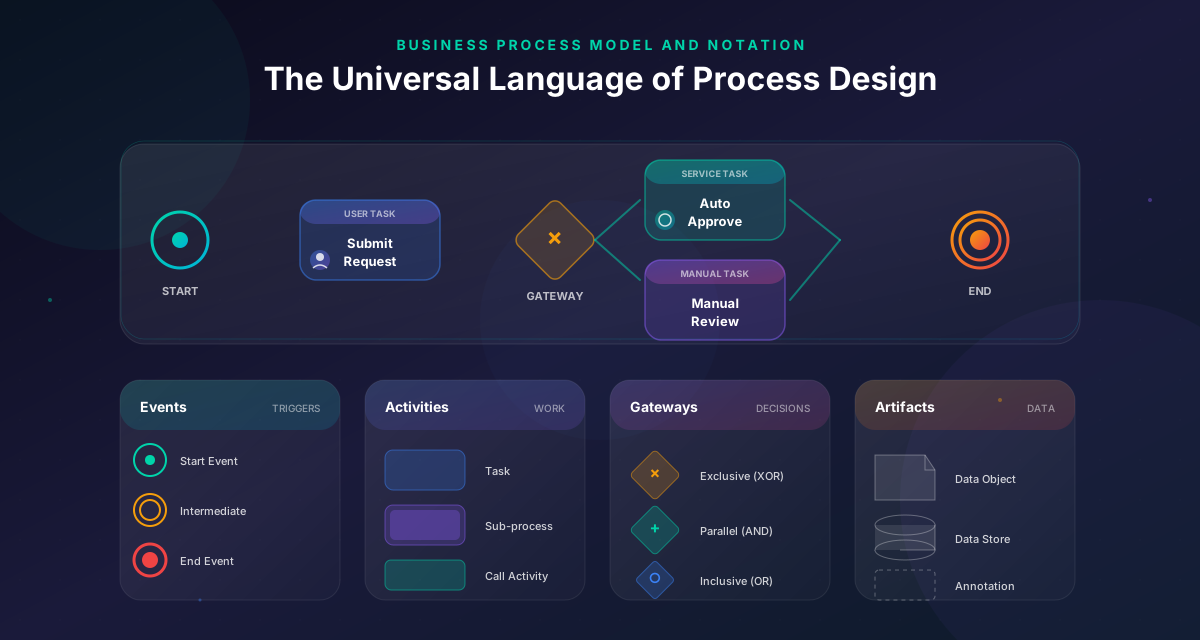
BPMN has four main categories of elements:
Events
Something happens: a process starts, receives a message, or ends. Events are circles.
- Start events (thin border): How the process begins
- Intermediate events (double border): Things that happen during the process
- End events (thick border): How the process concludes
Activities
Work that gets done. Activities are rounded rectangles.
- Tasks: Atomic units of work (e.g., "Review application")
- Subprocesses: Groups of tasks that can be collapsed
Gateways
Decision points where the path branches. Gateways are diamonds.
- Exclusive (XOR): One path is chosen (e.g., "Approved or rejected?")
- Parallel (AND): All paths execute simultaneously
- Inclusive (OR): One or more paths may execute
Flows
Arrows connecting elements, showing the sequence of work.
Pro tip: Don't over-model. If a gateway doesn't affect execution, you probably don't need it.
The 80/20 rule for BPMN
80% of useful BPMN diagrams use only events, tasks, and exclusive gateways. Master these before diving into advanced elements like message events or event subprocesses.
BPMN vs flowchart: when to use each
Flowcharts are great for quick communication. BPMN is designed for process clarity at scale—especially when multiple roles, systems, and exceptions are involved.
| Aspect | Flowchart | BPMN |
|---|---|---|
| Purpose | Quick visualization | Formal process documentation |
| Standardization | Informal | ISO standard (BPMN 2.0) |
| Roles/lanes | Optional | Built-in swimlanes |
| Automation | Not designed for | Execution-ready |
| Best for | Brainstorming | Operational processes |
When to use flowcharts: Brainstorming, explaining simple ideas, non-critical documentation.
When to use BPMN: Processes with multiple roles, compliance requirements, or automation potential.
Pro Tip
Start with a flowchart to capture the idea quickly. If the process involves approvals, escalations, or multiple systems, evolve it into BPMN.
BPMN best practices (starter set)
These practices help you create BPMN diagrams that people actually use:
1. Model the happy path first
Start with what happens when everything goes right. Add exceptions and error handling later—and only if they affect how work gets executed.
2. Use verb-object naming
Name activities with action verbs: "Approve invoice", "Send notification", "Validate data". Not "Invoice approval" or "Notification".
3. One start, one end (usually)
Most processes should have one clear start and one clear end. Multiple end events are okay for different outcomes (approved/rejected), but avoid spaghetti.
4. Make approvals explicit
Don't hide approvals inside tasks. Model them as explicit activities with clear owners. This matters for governance and automation.
5. Assign ownership
Every process needs an owner responsible for keeping it up-to-date. Unowned processes drift from reality.
6. Keep it readable
If you can't explain the diagram in 2 minutes, it's probably too complex. Split it into subprocesses or simplify.
Common BPMN mistakes to avoid
These mistakes undermine the value of BPMN modeling:
Mistake 1: Over-modeling exceptions Trying to capture every edge case makes diagrams unreadable and unmaintainable. Model the exceptions that actually affect execution.
Mistake 2: Unclear gateway conditions "Maybe" is not a valid gateway condition. Label each branch with explicit conditions (e.g., "Amount > $10,000").
Mistake 3: Forgetting about swimlanes Processes involve multiple roles. Use pools and lanes to show who's responsible for each step.
Mistake 4: No ownership defined A beautiful BPMN diagram that nobody maintains is worthless. Assign an owner and review schedule.
Mistake 5: Disconnected from reality The map is not the territory. BPMN diagrams should reflect how work actually happens, not how you wish it happened.
Getting started with BPMN
Ready to create your first BPMN diagram? Here's a practical approach:
Step 1: Choose a real process
Pick something you actually want to improve—not a hypothetical example. Approvals, onboarding, and request handling work well.
Step 2: Interview the people who do the work
Ask: "Walk me through what happens when..." Don't assume you know. The people doing the work know the real process.
Step 3: Draw the happy path
Start event → Main activities → End event. Just the normal flow, no exceptions yet.
Step 4: Add gateways for key decisions
Where does the path branch? What conditions determine the path? Add exclusive gateways.
Step 5: Assign roles with swimlanes
Who does each activity? Add pools and lanes to make responsibility clear.
Step 6: Review with stakeholders
Walk through the diagram with the people who do the work. Fix what doesn't match reality.
Step 7: Consider the next step
Is this just documentation? Or will you standardize as an SOP? Or automate?
Common mistakes to avoid
Learn from others so you don't repeat the same pitfalls.
Modeling every possible exception
Diagrams become unreadable and unmaintainable. Nobody uses them.
Model the happy path and the 2-3 exceptions that actually matter for execution.
Using BPMN like a flowchart
You miss the power of swimlanes, proper event types, and execution semantics.
Learn the BPMN elements that make diagrams execution-ready: events, gateways, pools.
Creating diagrams nobody maintains
Within months, the diagram no longer reflects reality. Trust evaporates.
Assign an owner. Schedule quarterly reviews. Connect diagrams to SOPs that get updated.
Take action
Your action checklist
Apply what you've learned with this practical checklist.
Choose one real process to model
Interview the people who do the work
Draw the happy path first
Add swimlanes for roles
Add gateways for key decisions
Review with stakeholders
Assign a process owner